AN INVITATION FROM J2 MAC

Import • Organize • Share • Enjoy
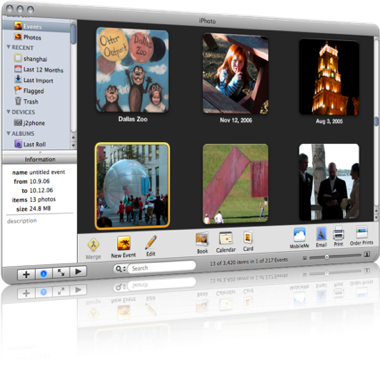
Join us for the inaugural J2 Lab!


We’re very excited about this series. The topic of our first session will be…

YOUR DIGITAL PHOTOGRAPHS:
 How do you get them into your Mac, what do you do with them once they’re there, how do you find them again, and what are the various ways you can share them with family, friends, and maybe even the whole wide world.

We will focus on Apple’s iPhoto and Flickr, the most popular and flexible online photo-sharing site.

Luca Enoteca has wifi, so bring your laptops; if you don’t use a laptop, you can watch our screen on a projector.

J2 Lab: Photo Wrangling
October 7, 2008
Noon – 2pm

Luca Enoteca
405 S Alamo St
San Antonio, TX 78205
(
map)

$35/person includes a delicious lunch.

Menu TBA

Click here to send an RSVP email to reserve your place.

Future J2 Lab sessions will cover:

  • Organization Without Paper!
    Use the Mac, iPhone, and internet can help you stay on task and productive, in your home, office, and on the go.
  • That Other 90% of Your Mac
    Fix that feeling of “I don’t think I’m using my computer to its full potential.” Understand your Mac, get faster on it, and find out what all those little bits of it are, which ones are helpful, and which ones you can ignore.
  • Ooh, Pretty!
    
Use Apple’s iWork to put some snazz in your communications.

Check our calendar at j2mac.com for upcoming events!
Things I download on everyone’s Mac

These are direct as I can make ’em. Click on the links, and in most cases, the software will start downloading.
  1. Firefox 7
  2. Google Earth and Google Chrome
  3. Flip4Mac and Silverlight (To play Windows Media files — this is just the latest version, but I’ll try to keep it updated. The company’s download site is here.)
  4. Perian (To play everything else. Same note as for Flip4Mac; download site here.)
  5. OpenOffice (direct link to download) – I want to encourage everyone to start thinking about editing docs online, but if you need an Office suite, this is as good as Microsoft’s.
  6. SMARTreporter – get notified if one of your hard drives is going to fail. Of course, even if it does, you’re fine, because you’re backing up every day, right? (Note: I don’t always do this one any longer.)
I also have a list of my favorite OS X tweaks here.

Things we love and hate

And then there are those phenomena that stoke our duplicity:

  1. Apple’s rigidly constrained product line: Purchase decisions are easy, but you always want that one other product — the iMac that’ll take 8GB RAM, the MacBook Air with FireWire, the … dare I say it … tablet.
      
  2. Apple’s increasing popularity: It was fun to drive the BMW of computers. But now every other car at the coffee shop … er, I mean, on the road … is a BMW. I think Mac users used to skew smarter and more open-minded; now we’re all over the place. Plus, as evidenced by the MobileMe fiasco, Apple needs to stop trying to be all things to all people. Let the iPhone sync wirelessly with other services like Google or Plaxo, why dontcha? (I mean, besides Exchange, which is discountable as a consumer solution.)
      
  3. The Mac mini: 2GB RAM? Really? Come on! It’s a fantastic machine. I’m typing on one now. Gigabit Ethernet. Fits anywhere. Super-slick. It’s my multimedia server, and home backup. Fantastic — until it runs out of memory, and then nothing but a reboot is gonna fix it. Reaaaaaally?
      
  4. Democracy
     
  5. An unhacked iPhone
     
  6. OS X Server: So good, so pretty, so clean, yet so limited, and not nearly stable or reliable enough. There’s a reason that MS Small Business Server is so popular; if you follow the Microsoft dogma, you don’t have to learn anything else to be a PC tech. Apple has waited too long to make the managed-client scenario obviously plug-and-play GUIfied. And it’s got a lame Address Book Directory, and a calendar server that won’t easily sync with the iPhone. REALLY?!
      
  7. The f@$%*& iTunes App Store. What a boon to the iPhone, but I really can’t believe Apple rejected a podcatcher application. Jerks.

Things that bug us

I’m compiling a list of junk that Erick and I run across that make us crazy. In some particular order, and warning: profanity follows…

  1. Western Digital MyBooks
  2. Maxtor drives
  3. Backup software not backing up
  4. Backup software not backing up because your stupid MyBook keeps unmounting itself
  5. Best Buy’s crappy prices and inventory
  6. That Best Buy sucks so bad we actually miss CompUSA
  7. Circuit City
  8. Altex
  9. The disturbing lack of a Fry’s Electronics store in San Antonio
  10. Yahoo not offering IMAP access to mail clients besides the iPhone
  11. Configuring email on a Blackberry
  12. Dell printers
  13. Gas prices
  14. Ill-informed AppleCare reps
  15. Tech-support phone monkeys who don’t listen, who assume they’re dealing with ignoramuses, and who keep insisting that you need to archive and install
  16. No CalDAV support on iPhone
  17. DSL
  18. Best Buy’s upping the price on DSL modems — Fuckers!
  19. Having to buy a modem at Best Buy because the know-nothing, knee-biting AT&T rep installed a crappy 2Wire wireless router even though the client had a router sitting right there.
  20. AT&T
  21. 2Wire
  22. AT&T’s damn DSL setup CD, which a client unsuspectingly inserted in their server, only to have it change the server’s network settings and screw up their whole operation.
  23. Lack of copy-paste on the iPhone
  24. Black iPhones shipping with white accessories
  25. Entourage (though admittedly less so these days, but don’t tell Microsoft I said so)
  26. Windows Windows Windows
  27. Windows Me
  28. Windows Vista
  29. Windows XP
  30. Windows 2000
  31. Microsoft Small Business Server
  32. Mac OS X Server (yeah, it’s on the list of Things We Dig, too)
  33. Printer/scanner manufacturers with poor driver rollouts for OS X
  34. Stupid fucking Jar Jar (I just had to)
To be continued…

My iPhone 2.0 Saga, Part III: Good news/bad news

I started getting this really annoying error in iTunes, when trying to check for updates in the App Store:

“We could not complete your iTunes Store request.
An unknown error occurred (5002).

There was an error in the iTunes Store. Please try again later.”

I had resolved this once in the past by deleting and redownloading apps, but that didn’t work this time. So, since the 2.1 update seemed to go so well with just a straight “Update”, I thought I’d see if the iPhone backup process really was fixed. I didn’t mention in Parts I or II that the 2.0 backup-and-restore system, besides taking an obnoxiously long time, also failed to restore all the preferences to the phone, thus requiring at least a partial reconfiguration of my device.

After ensuring that my backups were turned on, and that the MobileSync folder had a recent backup (only 7.9MB!), your intrepid correspondent hit the Restore button in iTunes. And…

…It worked! The restore process itself was pretty quick, though It took a while to reïnstall all the apps and the music and the photos and the podcasts, but that’s due to my own particular digital gluttony. All my app preferences and other configs and address book and SMS messages and everything came back. All I had to do was reörganize the apps on the Springboard (they installed alphabetically, which is understandable, though I still want Apple to make that easy).

But…

The stupid iTunes error remains. Last time, I tried changing my iTS password and reëntering my credit card info, according to suggestions in the Apple discussions, but that didn’t work, and I really don’t think that’s a reasonable fix, since Apple doesn’t let you use the same password that you’ve used in the last year.

I’m going to do further research on that, but the successful restore was worth an immediate post. 

P.S. I like umlauts.

Old G4 with processor upgrade is crashing

I have a G4 running 10.4.  I upgraded the processor last year.  It’s now panicking often. Blue screens. Freezes. Fun, fun. I am sure the original processor is somewhere, nearby, packed in a moving box.
The only thing I really want to save on that tower is, predictably, my iTunes library which is on a 2nd hard drive which is mounted separately from the original disk.

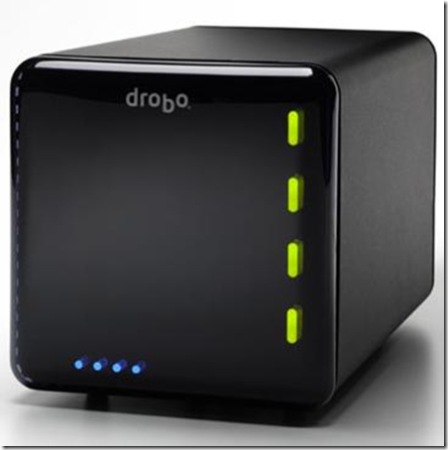
I suspect a new Mac will be purchased very soon. I have an original Drobo, but have yet to purchase drives for it.

Allow the yelling about backing up to commence.

I’m a bit biased here, as I have always distrusted processor upgrades. They just seemed more trouble and expense than benefit. Now with the Intel machines, I figure they’re pretty much irrelevant.

Your G4 may be salvageable, but I really do think you need a new Mac. Bite that bullet, bubba. And to get your data off the G4, if it won’t boot to FireWire target disk mode by booting while holding down the “T” key, you can buy a Firewire enclosure or even better, a data cable such as this one, for the internal hard drives from which you need to rescue data.

Excellent work buying that Drobo. Now about those drives

And then… BAAAAAAACCKK UPPPPPPPP!!!!

My iPhone 2.0 Saga, Part I: AppleCare

Starting about 2 weeks after I bought my iPhone 3G (which was on the day of its release), my third-party apps, those downloaded from the App Store, started crashing. All of them. Consistently. Tap on one, it flashes its first screen, then flashes away, back to the Home screen.

Feh.

For the next month, I suffered: I wiped the phone. I reinstalled. I backed up and restored. I did two full erases, which took upwards of an hour each. I restored again. I probably restored a dozen times, and most of those times I had to re-setup the phone from scratch. I learned a way to extract my SMS messages from the backup files (be ready to use the Terminal!). 

Finally I called AppleCare.

AppleCare for the iPhone is a funny thing. For the most part, the iPhone either works or it doesn’t. If it doesn’t, you restore it, and then it starts working again. If the restore doesn’t work, you have a bad phone and you need to take it to the Apple Store so they can replace it.

So I was surprised when the first rep I talked to had recommendations beyond that, and very weird ones, to boot. He told me that:

a) I had too many applications on the phone; that the phone, like a computer, couldn’t handle too many applications running at the same time. I said they weren’t running at the same time: It is very clear that only Apple applications can run background processes, and all third-party programs stop everything when you go close them. He said that wasn’t true. I said Steve Jobs had said it He said it wasn’t true. I said, show me some documentation, something to tell me that there is a maximum number of apps you should keep. He said he didn’t need documentation; he learned it in training. I said, no you bloody well did NOT.

b) I should reboot my phone every day, just like my computer. I told him I very rarely need to reboot my computer. He said I needed to. I said, show me some documentation, something to tell me that there is a maximum number of apps you should keep. He said he didn’t need documentation; he learned it in training. I said, no you bloody well did NOT.

And then I said, lemme talk to your supervisor.

After about 20 minutes, a very friendly and helpful tier-2 technician came on the horn. I told him about a) and b), and he assured me that he had instructed the previous phone monkey not to spread bullpuckey like that around anymore. Thank you, I said, from the entire iPhone-using populace.

Then began our dialogue, by phone and email, trying to resolve my app-crashing issue. We went through the whole restore process a couple more times, when finally he suggested the procedure that, for organizational purposes and ease of reading, I’m going to post in Part II.

iPhone 2.1: so far, so good

I haven’t gotten a chance to post my iPhone saga. Gonna do that next, but right here I just want to record that I was able to run the plain ol’ software update from within iTunes, and it went smooth as silk. So far, the phone is behaving, and backups in iTunes do happen a lot faster, as promised, so this post should be less relevant from here on out.
I haven’t put battery life to the full test. Here’s hoping…!

Drobo failure

Man, I love my Drobo. I even wrote about it for our local alt-newsweekly. We’ve installed Drobos at several clients, and we’ve never had occasion to consider any other mass-storage device. Their support has been stellar … up to now.
Two weeks ago, the drive volume on my Drobo went belly-up. Couldn’t access it except for just long enough — THANK GOODNESS — to back up everything. I tried reformatting it but the damn thing won’t stay mounted.

The thing is, I wouldn’t mind as much if the Drobo engineers weren’t still, purportedly, looking at my diagnostic file, after a WEEK. I’m stuck. It was easy enough to retrieve my financial data, but my music and multimedia remain in limbo on a single external hard drive. I want to try another reformat, or maybe buy an additional SATA drive to increase storage (it wasn’t near full, and all of the disk lights were all-systems-go green), but I really just need to hear something from the engineers to set my mind at ease.