Almost every normally used device needs more room to backup and store photos than the 5 GB that Apple includes with every free iCloud plan. Fret not: you can buy more iCloud Storage.
Many, many Mac users assume that iCloud backs up their Macs. It absolutely, categorically does not.
Every Mac or PC user should have a cloud-backup service such as Backblaze. Individually owned computers can use the Personal Backup product, while any owned by an organization can be under the Business Backup plan. [Those are affiliate links.]
Businesses might have their mobile devices signed into iCloud accounts under the user’s organizational email address. The user should know that the organization owns every bit of information on that device.
Highlighting some of my favorite small details that may prove to be big boons.
With so many big and small improvements in iOS 13, Apple has resolved lots of deficiencies and complaints. To me, this is the year that iPhones and iPads graduate, from amazing gadgets that clever people have figured out how to use as business devices, to real productivity workhorses.
You can read about the big headlines here: iOS 13 – Apple. I just want to highlight some of my favorite small details that may prove to be big boons:
Long press is more relaxing than 3D Touch. It will become as natural as right-click. Best to standardize on it and move on.
Once again being able to triple-tap to select a whole paragraph. (Doesn’t work in all apps.)
This revised menu is great in general, but the font-size buttons in Safari are especially welcome:
This has been around but I just rediscovered it: Long press on the square at the bottom right of Safari:

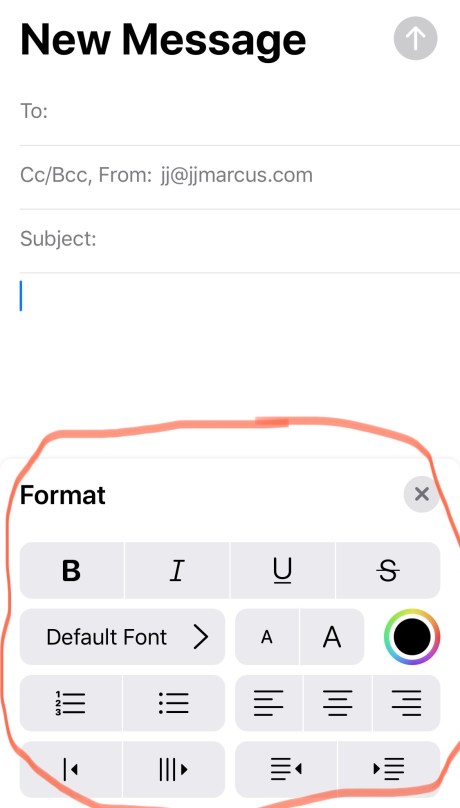
A little shortcuts bar for adding and formatting content in email. A huge improvement from the old white-on-black contextual menu.
And iOS Mail becomes a real modern email client.
Swipe-to-type has been around in third-party keyboards for a while, but Apple gave those short shrift, so having it native with the QuickPath keyboard is really huge:
The new Siri voices are really smooth and natural.
Voice Control is going to be incredible for differently abled people, but even while I am lucky enough to I have average use of my limbs in digits, I think I will probably be using it to dictate naturally without having to press the microphone button. Selecting and replacing text is as easy as it ever was with Dragon NaturallySpeaking.
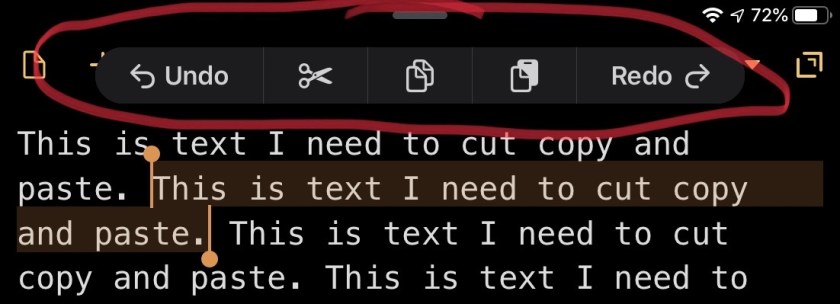
This very convenient menu pops up when you tap-and-hold three fingers anywhere on the screen when you’re editing text.
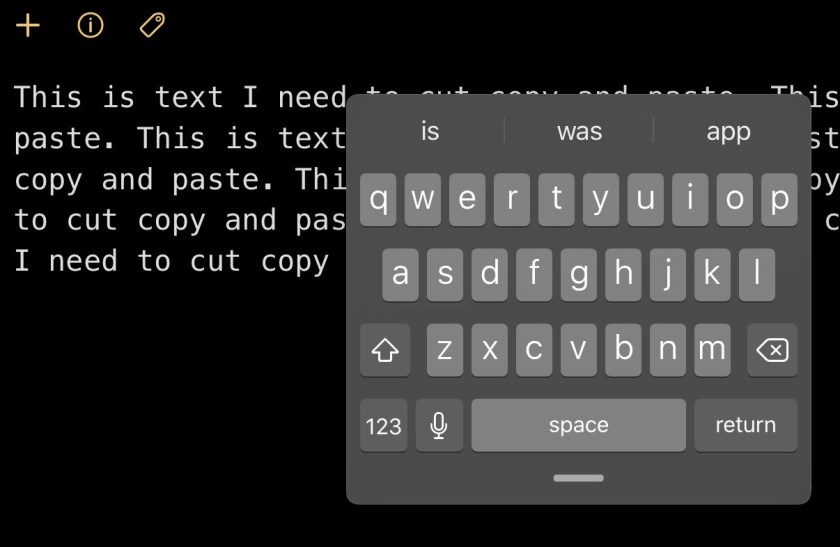
How about this mini keyboard on the iPad that behaves more like the iPhone keyboard?
I’m a little surprised that this matters to me, but buttons with icons instead of words is welcome. In voicemail, the red delete button stands out better.
Time to update the buying guide for 2019. And even if Apple does release the rumored 16-inch MacBook Pro in October, all of the following will still apply for now.
I’m fine with someone buying a used computer as long as the service they go through has buyer protection (e.g. eBay). But refurbished machines from Apple or OWC, especially ones covered by warranty, are a superb option
Base specs for any Mac
Getting less than this is wasting money and, worse, productivity:
At least 16 GB RAM (memory)
Absolutely get Flash Storage (a.k.a. solid-state drive or SSD), and not a SATA drive or “Fusion” Drive
At least 512 GB Flash Storage, though I prefer 1 TB for most folks
Make sure it is covered by the AppleCare warranty if it is younger than three years old
Laptop models
MacBook Pros with Retina screens from 2014 or 2015 are great. And the MacBook Air from 2018 is also great. Do not buy a MacBook Air older than 2018 unless you get some kind of great deal on it ($400 or less) and it has at least 8 GB of memory. 
Do not buy any laptops made in 2016 or 2017, and I generally recommend against 2018 MacBook Pros, because the keyboard is controversial-bordering-on-tragic, and the Touch Bar is kind of gimmicky, and they are generally overpriced. But if you need one and you have the jack, a 2018 MBP is basically fine.
Do not buy any year of the 12-inch MacBook, unless you have very specific needs for lightness and don’t require a great deal of power.
Desktop models
Any iMac with a Retina screen is fantastic. If you’re a professional who works with images, get an iMac made since 2016 because the color gamut of the monitor is wider.
The 2018 Mac mini is one of the coolest Mac models ever.
If you’re a professional who needs an iMac Pro or the soon to be released Mac Pro, you know who you are and you probably aren’t reading this section.
I am thinking of buying a new iPad or gently used one. My current phone is a 64GB model and I’ve barely used half of the storage, so I think a 64GB iPad would do it. But I don’t know about cellular. What are your thoughts?
I love my new iPad Air (and the new iPadOS!), and while I might enjoy a Pro that much more, I know my personal productivity wouldn’t benefit that much from the extra performance. The new iPad minis are also super sleek and totable.
I have found that, because of better cameras that inspire more photography, and more available media to enjoy, it’s really a good idea for most people to spring for at least 128GB. That said, if your usage has not grown like that, perhaps you’d do fine with 64GB. If you at all suspect your needs might increase, get the bigger size.
Since the phones got personal hotspots, I no longer keep a cellular account for my iPad. If you’re that mobile and need the Internet always on at a moment’s notice, get the cellular, otherwise skip it.
And I’m alllll about buying refurbished devices as long as they are under warranty!
Got a MacBook Pro 13-inch 2018 2.7 MHz i7 with 16 gigabytes of ram. The battery dies crazy fast running programs like Ableton and Logic. Like in less than an hour.
I wish that were surprising, but activity like audio production is going to drain any computer’s battery a lot faster than typical use does. Also, as the Mac will scale down the performance of its processor when it’s on battery, you will find it to be a lesser experience in other ways as well.
With all that said, if you have to or just really want to do that work without being jacked into power, you’ll want to take steps to optimize the pull on your battery. Here are some good tips for that.
The suggestion of restarting is crucial. And in the special case of a focused production session, I uncheck the box to “reopen windows when logging back in,” so that I start with a very fresh system that has less stuff churning in the background. Then I only open up the apps I absolutely need to run to do that particular work.
I’ll also highlight turning off Wi-Fi and Bluetooth. Web browsing and email consume more juice than you’d think, so avoid even opening those apps at all if you can do that stuff on your phone or tablet.
Try that and let me know if you still run into issues. It’s not impossible, but real real unlikely your battery is bad, and we’d need to try these other things first before we hollered at Apple.
Why does Maps on my iMac need WiFi? I’m plugged in to the router with Ethernet.
It seems goofy, right? Here’s the scoop: Your internet connection doesn’t give away your exact location. (Your ISP knows your address and could reveal it to the po-po, but it’s not public info.) So Apple uses wifi to triangulate the position of your computer based on the location of wifi networks that the Mac can detect.
They did the same thing on the iPhone before it had real GPS.
I really prefer writing about fun things, but I want to address this to a) allay your fears, but b) make you worried if you still use the same password for all your online accounts.
Here’s the latest scam. You get an email like this:
From: Jerky von Intertroll
To: You
Subject: I know your password
I’m aware that is your password.
You don’t know me and you’re thinking why you received this e mail, right? Well, I actually placed a malware on the porn website and guess what, you visited this web site to have fun (you know what I mean)…Send me money via BitCoin or I will lock your computer and release your browsing history to the world…
I have heard from a handful of people who have received these emails. The illustrious Brian Krebs and others have written well about the scam, but here’s the nut of it:
It’s a new plague and is almost totally bogus. “Almost” because if they’ve included a password that you know you still use, you need to take some actions.
With all of the information breaches in the last few years, many of the passwords that we — like, all the users of the Internet — have used on various websites have been leaked. As long as you are diligent about using good passwords, and different ones on every site, you can ignore these messages.
So let’s say this message reveals a password that you have indeed used at some point. If you see it and think, “Oh, I still use that one all over the place,” then that’s a good prompt to go around and set up new passwords wherever pertinent.
If any of y’all don’t already use a password manager, please allow me to introduce you to one. It can provide instant relief for any concern a message like this might engender.
All of the new ones are pretty kickass, and all have benefits. The XS (Apple pronounces it “ten-ess”) and its big brother are great, with two cameras on the back, but the one everyone is talking about is the XR. Comes in cool colors!
I’d look real hard at that one. The XS Max is nice but kind of enormous; I already have enough discomfort with the 8 Plus in a jeans pocket.
If you like two cameras (and I do, a lot) or a somewhat better display with richer blacks, get the XS. If you just want a kick-ass phone with amazing battery life at a good value, get the XR.
Does storage matter? 64 GB XS at $999 vs. 128 XR at $799
Fantastic question: I do like the 256 GB (gigabytes) in my 8 Plus. It’s a wee gluttonous, but I no longer have to worry a whit about my storage when I’m shooting video. Also, the 8 only came in 64 GB or 256 GB, and 64 was too small for me. So, it depends on your current usage, but I prefer at least 128.
You must be logged in to post a comment.